


Peter Dahl
3 min read · Oct 23, 2026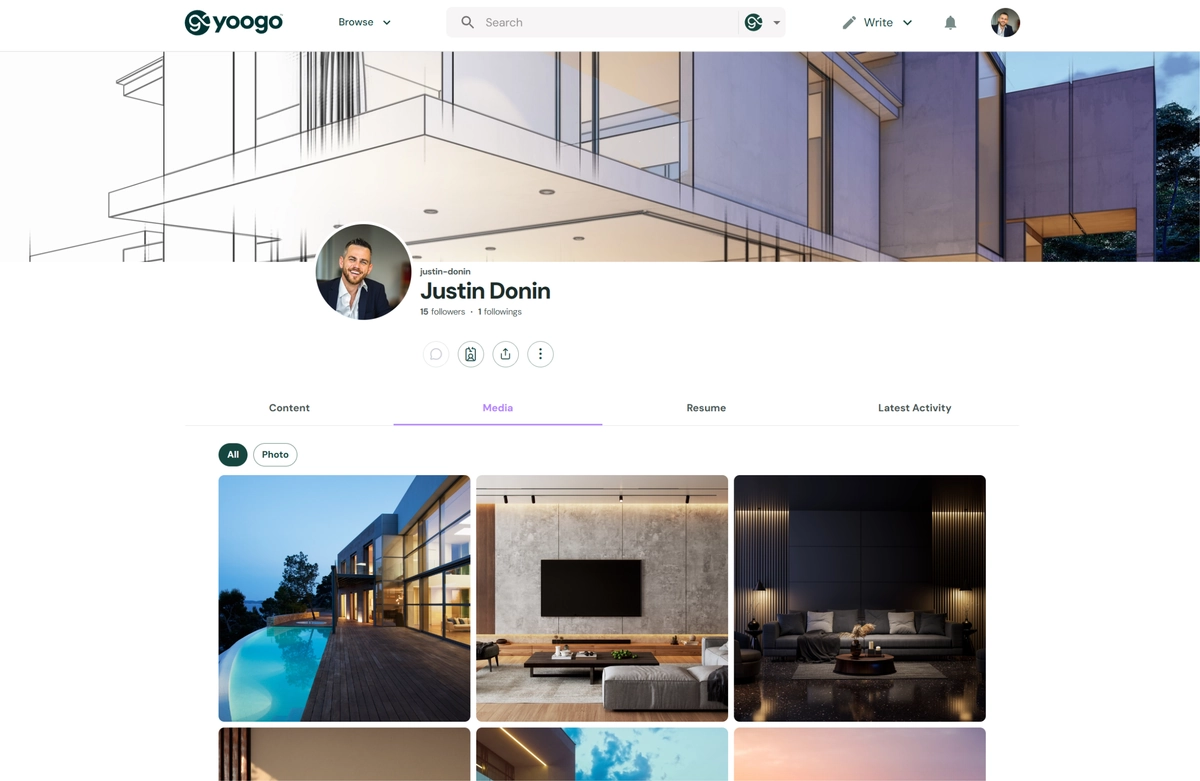
Your Yoogo Individual Profile is your personal space on the platform. It introduces you to other users and brings together the content, media, professional information, and activity you publish on Yoogo.
Unlike a traditional profile that requires you to fill out many fields, your Yoogo profile builds itself over time as you publish content and participate on the platform.
Add Your Profile Image
Upload an avatar or profile image that represents you. Your profile image appears alongside your profile and alongside your activity across Yoogo, helping other users recognize you.
To add or change your profile image:
- Click the vertical three-dot menu (⋮) on your profile.
- Select Change Avatar.
- Upload an image from your computer, or drag and drop the desired image into the upload area.
- If needed, adjust or edit the image before saving.
- Save your changes to update your profile image.
Add a Background Image
You can optionally upload a background image to personalize your profile's appearance. Choose an image that reflects your interests, profession, creative work, or personal style.
To add or change your background image:
- Click Change Cover Photo in the upper-right corner of your profile.
- Upload the background image you want to use.
- Save your changes.
If you prefer not to display a background image, turn on the No Cover Photo slider located below the Change Cover Photo button.
Add Your Basic Information
You can add information that helps visitors quickly understand who you are and what you do, including:
- Tagline – A short description that appears prominently on your profile.
- About Me – Introduce yourself, your interests, experience, work, or areas of expertise.
- Website Links – Add links to your personal website, portfolio, blog, or other websites.
Social Media Links – Connect visitors to your social media profiles and other online presence.
To add or update your profile information:
- Click the vertical three-dot menu (⋮) on your profile.
- Select Edit Profile Details.
- Enter or update the information you want to include.
- Save your changes.
You and other users can view the information you enter by clicking the ID card icon located below your name on your profile. This provides quick access to your profile details, including your About Me information, tagline, website links, and social media links.
Your Profile Builds Automatically
You do not need to add everything you create to your profile manually.
As you publish content on Yoogo, your profile is automatically populated with your published work and activity. This allows your profile to continue growing and becoming more informative as you use the platform.
Your profile includes several sections:
Content
The Content section brings together the content you publish or create on Yoogo, including:
- Stories and blog posts
- Channels
- Documents
- Web bookmarks
- Events
This gives visitors one place to explore the information, ideas, resources, and content you have shared.
Media
The Media section presents your visual and media content in a gallery view.
It can include:
- Images
- Videos
- Media from your published content
- Web bookmarks
The gallery makes it easy for visitors to visually browse your work and discover your content.
Resume
The Resume section allows you to add your professional resume to your profile.
Use this section to present your professional background, experience, education, skills, and other career information.
Latest Activity
The Latest Activity section displays your most recent activity on Yoogo, including recently published posts and content.
This gives visitors a quick view of what you have been sharing and working on recently.
Keep Your Profile Growing
The easiest way to build a strong Yoogo profile is simply to use Yoogo.
Complete your basic profile information, add a recognizable profile image, and then begin publishing stories, media, bookmarks, documents, events, and other content. As you publish, your profile becomes a growing collection of your interests, knowledge, work, and activity.
Interest Area